Label Studio
Design & print professional honey labels
Overview
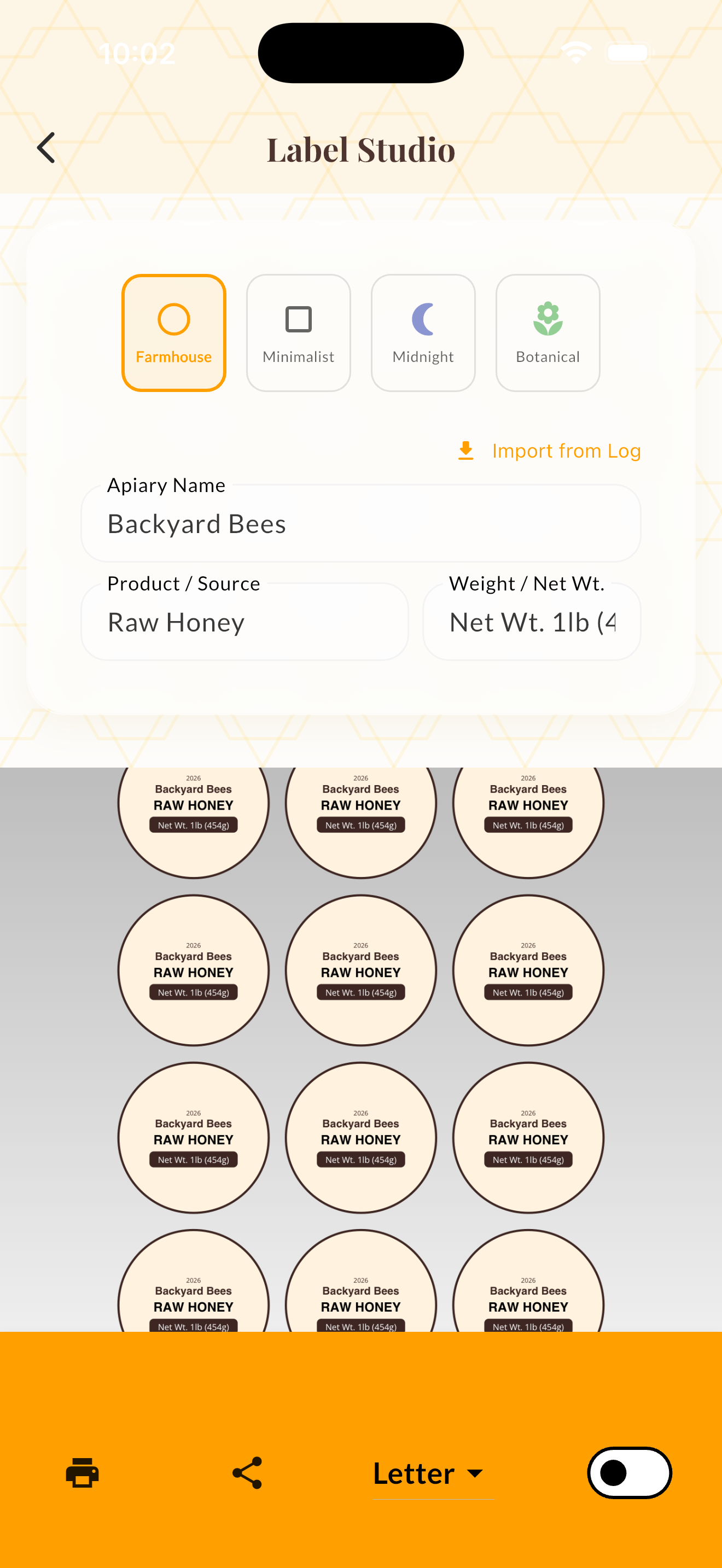
Label Studio lets you design and print professional honey jar labels directly from your phone or browser. Choose from four built-in styles — Farmhouse, Minimalist, Midnight, and Botanical — and customize your apiary name, honey variety, and net weight.
Labels can include QR codes that link to your honey's provenance page — showing customers the specific hive, harvest date, and floral sources. This builds trust and adds value to your product.
You can import data directly from a harvest batch to auto-fill label fields. The live preview shows your label as you edit, and you can export as PDF for printing on standard label sheets. CJK fonts are supported for international labels.
How It Works
Open Label Studio from the tools menu.
Choose one of the four label styles: Farmhouse, Minimalist, Midnight, or Botanical.
Edit the apiary name, product name, and net weight fields.
Optionally tap "Import from Harvest" to auto-fill from an existing harvest batch.
Use the live preview to review, then export as PDF for printing.
Tips & Best Practices
- 💡Include the net weight in both ounces and grams for maximum market reach.
- 💡A QR provenance code on the label adds perceived value and builds customer trust.
- 💡Use high-contrast designs that are readable at jar size — simple is usually better.
- 💡Keep a consistent design across varieties but vary the color scheme per honey type.